Введение
Replacing the LCD face requires removal of a few small screws on the outside of the device.
Инструменты


-
-
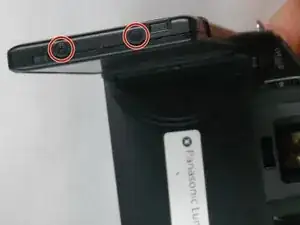
Use J0 screwdriver to remove the two 3.2 mm screws from the outside of the assembly.
-
Use the J0 screwsdriver to remove the two 5.6 mm screws from the inside of the face near the swivel.
-
Rotate the face to more easily gain access to the screws.
-
-
-
Slide the wide plastic opening tool underneath the crack of the side of the face and separate the components.
-
-
-
Carefully remove the filament connections from the LCD backing by lifting the black lever up first on the connector, then pulling gently outward from the LCD backing with your fingers.
-
Replace the filament connections into the backing of the new LCD face to complete replacement..
-


To reassemble your device, follow these instructions in reverse order.
