Введение

Инструменты

  1. yKWCvFibyvUIwx1D
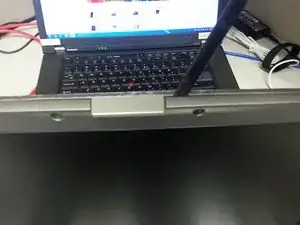
    • Remove the 6 screws underneath the rubber things - located in red

  2. GhLKCxPpCvLj1flZ
    GhLKCxPpCvLj1flZ
    xYApP6QpG2CuTT4t
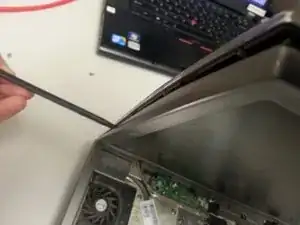
    • Use your spudger to pry off the front case

    • Go all around the perimeter and pop it off

  3. UGRskLKGLgdQ1g5A
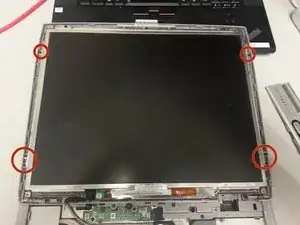
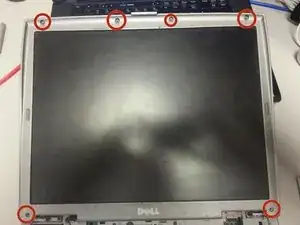
    • Remove the 6 screws holding in the display screen

  4. W5Tgd1Euv5FLspJa
    W5Tgd1Euv5FLspJa
    PWEgGRpmpNtiBMiE
    LZTGDhEKgcOMRBxT
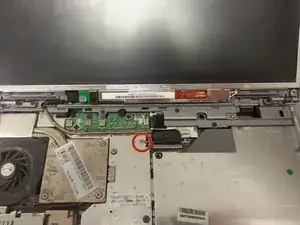
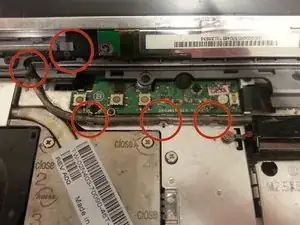
    • Remove the screw holding in the display cable connector

    • Pull the black tab up to remove the display cable connector

  5. VFmjSCSEBGZMkM5G
    • Slowly Remove the wire from the joints holding it in

  6. 6YRGJXWi6WrlOHig
    6YRGJXWi6WrlOHig
    hoRGXFfApjcA6lZZ
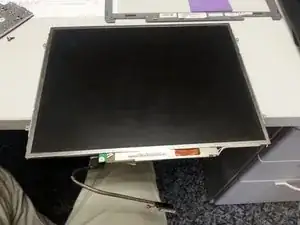
    • The computer is happy you are fixing him

    • Thats it, display is now removed feel free to replace it by doing the steps in reverse

Заключение

To reassemble your device, follow these instructions in reverse order.

Joseph

Участник c: 16/07/14

1497 Репутация

Один комментарий

I see you removed the keyboard by seeing it in the background of the last image however, I do not see the steps instructing everyone on how to remove the keyboard.

Darren -